RSS WA
  1. You are here:  
  2. Home
  3. GENERAL
Hits: 72

Week to Date / Weekly Activity Report

  • Breaks down Draw and Scratch transactions
    • Does not track the individual scratch ticket sales
  • Can generate reports for up to 180 days back
  • Lists draw game sales and separates by game
  • Separates payout totals by draw and scratch
  • Lists cancellations and promotions
  • Provides accounting information for the week
  • Report will run from 12:00am on Sunday-11:59pm on Saturday
  • Can be printed at any time throughout the week
    • Will continue to total sales throughout the week
    • Cannot print sales from specific time of day
  • Can be printed up to 6 months back, if needed
    • Enter date within week (Sun- Sat) needed


Generating and Running Weekly Activity Reports:

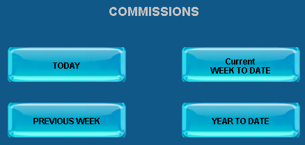
accessing week to date reports


Press Current Week to Date to run a report for sales throughout the current week. Retailers can also press Previous Week to generate a report for a previous week’s sales.

current or previous


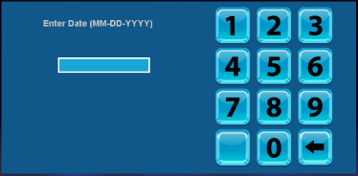
Retailers will need to enter a specific date when running a previous week’s activity report. The report will include sales for the week leading up to the date selected.

date pad


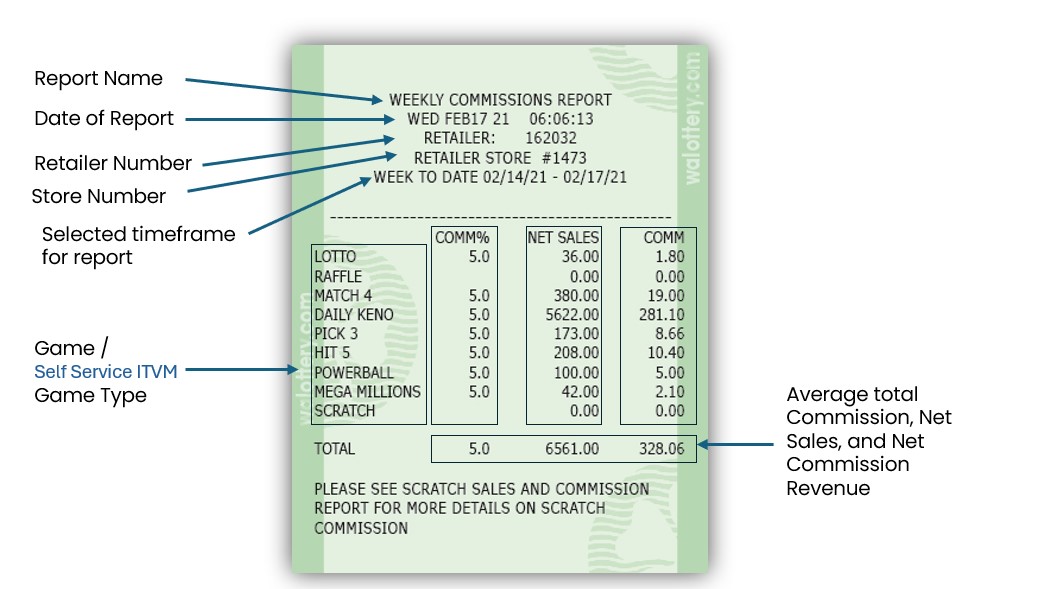
Weekly Activity Report Overview:

week to date report update


Report Information

  • Sales
    • Draw Games [All Draw Games]
      • Includes quantity of tickets and dollar values
      • Does not include any scratch ticket sales
    • Total Sales
      • The sum of all draw sales from the lottery terminal
      • Includes total quantity and dollar value


  • Cancels
    • Any draw game tickets that have been canceled
      • Mega Millions, Powerball, and Cash Pop cannot be canceled
      • Tickets must be canceled before draw sales closure
    • Retailer will be automatically refunded for any canceled tickets
    • Canceled tickets will still appear in “Sales” section of report


  • Promotions
    • Free Tickets
      • Draw game tickets produced using lottery coupons
        • i.e. Buy One, Get One Free Coupon
    • Free Hit5 Replay
      • Free Hit5 ticket produced from scanning a winning Hit5 ticket
      • Bottom tier prize for Hit5 is a free Hit5 ticket


  • Total Paid
    • Total of draw game tickets paid out
      • Does not include any payouts of scratch tickets
      • Includes quantity of tickets and total dollar value


  • Commissions
    • Total commissions from draw ticket sales
    • Does not include any commissions from scratch ticket sales


  • Draw Game Net
    • Total Sum for all draw games items


  • Scratch Cash Summary


  • Settled Packs
    • Packs that have reached the settlement threshold
      • 50 days since activation or 80% validated (paid out)
      • Will show quantity of packs and dollar value
    • Will not be charged for settled packs until Tuesday’s EFT withdrawal
    • Contact Lottery Rep for any questions or issues with settled packs


  • Commissions
    • Commissions for scratch ticket sales
    • Does not include any draw game commissions


  • Return Tickets
    • Tickets that have been returned by the Lottery District Sales Rep
      • Includes quantity and total dollar value
    • Tickets that have already been settled (been paid for)
      • Receive credit back for any unsold tickets
    • Tickets past validation (older tickets)
    • Contact Lottery Rep for any questions or issues with return tickets


  • Pays
    • Total of scratch tickets paid out
      • Does not include any payouts for draw game tickets
      • Includes quantity and total dollar value


  • Scratch Net
    • Total Sum for all Scratch ticket items


  • Adjustments


  • Debit
    • Debit sales from the vending machine
      • Will only show sales information for retailers with vending machine terminals
    • Quantity of sales and total dollar value


Hits: 115
Daily Sales
Daily Sales

week to date
Week to Date

weekly settlement
Weekly Settlement


winning numbers
Winning Numbers

all winning numbers
All Winning Numbers

previous pick 3 winning numbers
Previous Pick3
Winning Numbers


retailer information
Retailer Information

draw game validation
Draw Game
Validations
commissions
Commissions


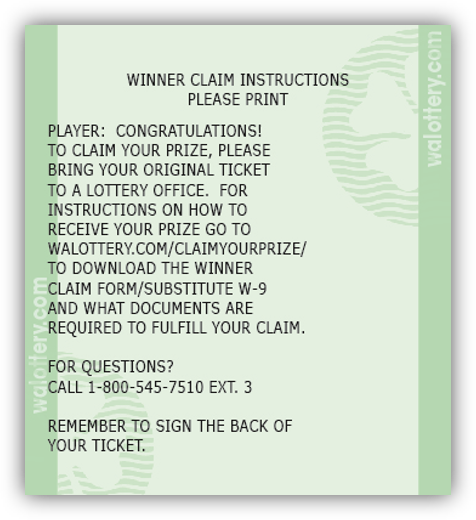
claim instructions
Claim Instructions

jackpot
Jackpot

draw games clerk
Draw Games
Clerk


promo draw
Promo Draw


Hits: 87

Redeem Coupon

At any given time, the lottery may run a promotion that generates a free Draw Game. These coupons can be scanned and redeemed at any GT-1200.

accessing redeem button


Redeeming Coupons:

  1. Retailers can navigate to the Redeem Coupon Button by pressing the Draw Games Functions button then Redeem Coupon.

  2. Once the Redeem Coupon Button is pressed, a new screen will appear guiding Retailers to Scan the Coupon or Enter the Coupon’s Serial Number.
    coupon entry
  3. After scanning Coupon’s barcode or entering the serial number, the GT-1200 will bring the Retailer to the purchase screen of the Draw Game for that promotion where the player’s free ticket and wager created.
    coupon wager screen
  4. Press Manual Entry or Quick Pick to complete transaction.


Example of Coupon:

coupon frontcoupon back


Note: Washington’s Lottery coupons will typically have instructions listed on the back. Retailers should follow these steps as indicated.

Hits: 74

Draw Functions Cancel

The Draw Functions Cancel button…..


accessing draw cancel button


Payouts for Draw Games:


DRAW FUNCTIONS CANCEL NEEDED


Mega Millions, PowerBall and Cash POP can not be canceled.

No tickets associated with Bundle Pack purchases

No tickets that qualify for and promotion.

Draw Game Tickets cannot be cancelled after the draw has occurred.

Page 22 of 46

  • 17
  • 18
  • 19
  • 20
  • 21
  • 22
  • 23
  • 24
  • 25
  • 26

Frequently Used (Top 10)

  • Selling Powerball on the GT-1200 Retailer Terminal
  • GT1200 Content
  • Shift Report and Cash Reconciliation
  • Gemini Touch 24/28 Content
  • Services
  • Printer - GT1200
  • MEI Bill Acceptor and Cash Box Removal - Gemini Touch
  • Activation
  • Display Touch Screen - GT1200
  • Supply Orders

Recently Published

  • Out of Stock Prevention and Best Practices Guides
  • Content Coming
  • Configuration Report
  • DSR Sign-on & Instant Showcase Reports
  • Loading Unloading Scratch Tickets

Recently Modified

  • Scratch Reports: Shipment Report
  • GT1200 Scratch Reports
  • Customer Ticket Checker
  • Barcode Scanner - GT1200
  • Display Touch Screen - GT1200