
Jammed - Does Not Accept Bills
Video Available
Clearing a Bill Acceptor Jam (.19 seconds)
-
Open the bill acceptor door with the security key and tilt the assembly down.
-
Remove the acceptor module by pushing up the silver latching and pulling straight out.
-
Place your fingers on the black groove and chrome bar and squeeze to release the bill acceptor read head.
-
Gently lift the read head from the bill acceptor. This allows you to clear jammed bills.
-
After the bill acceptor has been cleared, gently slide it down into its locked position. If the bill acceptor is put into its proper position, it will reset after 10 seconds.
-
Check the playslip reader for any objects like an instant ticket, or jammed paper - remove object(s).
-
Confirm the reader housing is completely closed.
-
-
Power reset the terminal by toggling the lighted on/off switch above the keypad.
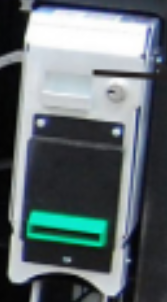
GT28 Bill Acceptor
GT20 Bill Acceptor / Cash Box
Cleaning the Acceptor Module
Note: You MUST remove the acceptor module from the chassis to open the front sensor area. Forcing the note path open without removing the acceptor module from the chassis damages the unit. Remember to turn off the machine before performing any cleaning.
-
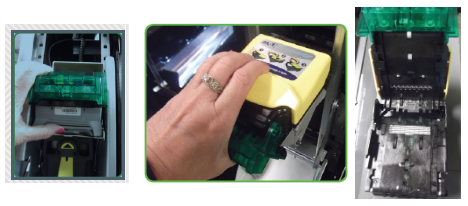
Remove the acceptor module from the chasis.
-
Open the acceptor module.
-
Place the palm of your hand on the front of the module and your fingers around the top of the yellow cover.
-
Pull the cover toward your hand and lift up, opening the head fully.
-
-
Clear the note path area of foreign objects.
-
Wipe the note path and sensor areas, as needed, with a soft - damp cloth.
-
Be sure to wipe the side walls of the optics housing.
-
For stubborn dirt, a small amount of mild - non-abbrasive soap may be added to the water before dampening the cloth.
-
Make sure no streaks or residual soap remain on the note path.
-